Invoicing with Blawby
Invoices in Blawby are generated from a matter. The matter's unbilled summary (logged time, expenses, flat-fee line items, retainer draws) rolls into an invoice in one click. The client pays through a Stripe-hosted link; the invoice flips to Paid automatically when payment clears.
This page covers the operational flow. For the broader matter context — billing types, retainer balances, the seven matter tabs — see Matters Overview.
Generate an invoice
- Open the matter. Most invoices come from active matters; you can also generate one from the Matters list view.
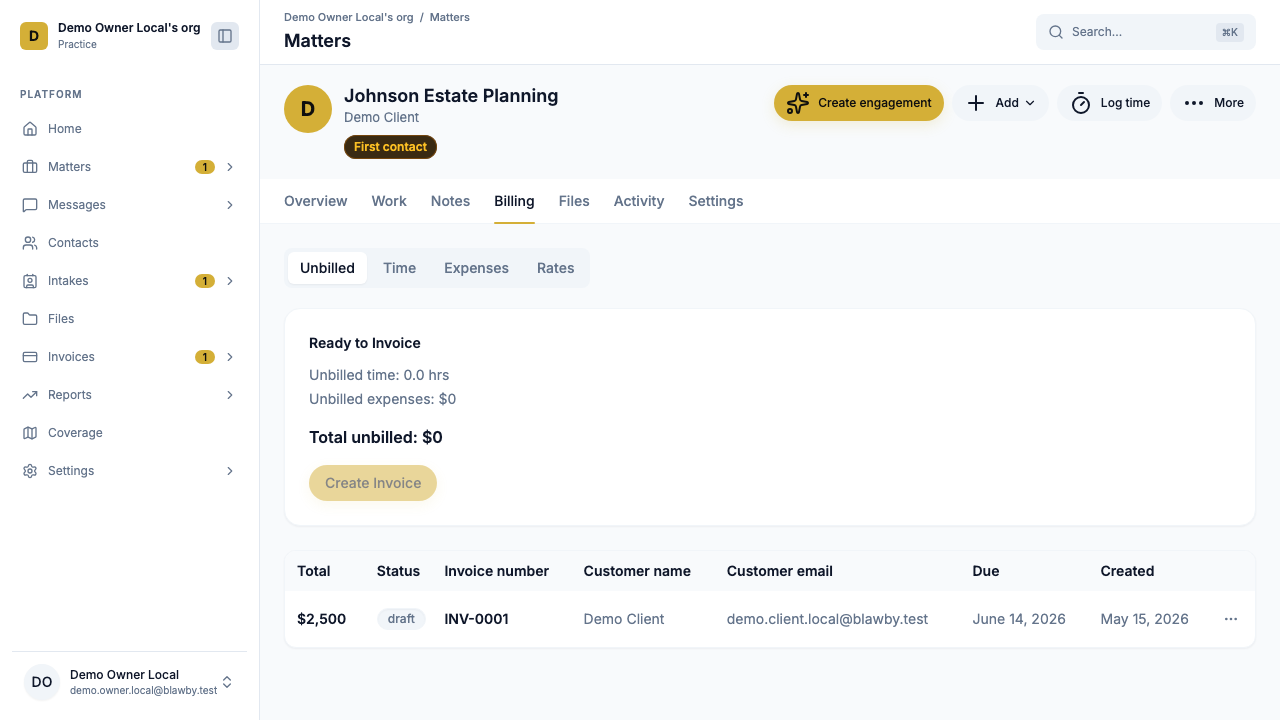
- Switch to the Billing tab. The unbilled summary card shows your billable hours, unbilled expenses, and any flat-fee or retainer items waiting to be invoiced.
- Click Generate invoice. The line items pull from the unbilled summary automatically.
- Edit if needed. Adjust descriptions, remove items you're not billing yet, or add a flat-fee or retainer-draw line.
- Set the due date. Defaults to your firm's invoice terms; can be changed per invoice.
- Preview, then Send. The client gets an email with a Stripe-hosted pay link.
What the client sees
The email contains a clear summary, the line items, the total, and a Pay button:
- They click Pay.
- Stripe's hosted checkout collects card or ACH details.
- They pay; the invoice flips to Paid in your dashboard automatically.
- Both sides get a confirmation email with receipt.
For ACH payments, the invoice shows Pending until Stripe confirms settlement (a few business days). No action needed on your side.
Invoice types Blawby supports
Each line item on an invoice can be:
- Time entry — hourly billing pulled from the matter's logged time. Rate applies per user role (attorney vs. admin).
- Expense — flat amounts logged on the matter (filing fees, court costs, etc.).
- Flat fee — for engagement work priced as a fixed amount.
- Retainer draw — bills against the matter's retainer balance. If the balance is short, the client pays the difference.
A single invoice can mix types — common pattern: hourly time entries plus a flat-fee filing line plus an expense reimbursement, all on one invoice.
Status lifecycle
Draft → Sent → (Pending) → Paid
                  ↓
               Overdue
- Draft — generated but not sent. Edit freely.
- Sent — email is out, client has the pay link.
- Pending — for ACH; payment initiated, awaiting Stripe settlement.
- Paid — payment cleared. Time entries flagged "billed."
- Overdue — past due date and not paid. Reminder logic kicks in (configurable).
Status changes log to the matter's Activity tab automatically.
Retainer-draw invoices
For retainer matters, the invoicing flow draws from the retainer balance:
- Generate the invoice from the unbilled summary as usual.
- The system applies the matter's retainer balance to the invoice total.
- If retainer covers it: client pays $0; balance reduces; you receive the funds via your trust-routing config.
- If retainer falls short: client pays the difference via Stripe; future invoices keep drawing from the balance.
- Send a top-up invoice when the balance gets low — same flow, but the line item is a retainer draw, not time entries.
Refunding an invoice
Open the paid invoice → Refund. Refunds use Stripe's API; the invoice records the refund and notifies the client. Partial refunds are supported.
When to use a payment link instead
Invoices require a due date of at least the next day. If you need to collect immediately (consultation fee, retainer top-up, donation), use a pre-filled payment link instead:
https://blawby.com/your-firm-slug?amount=12500
amount in cents. See Accepting Payments for the full payment link flow.
Common questions
Can I invoice without a matter? Most invoicing flows through a matter. For one-off charges that aren't matter-bound, use payment links.
Do invoices include my firm branding? Yes — your firm name, accent color, and logo (configured in Settings → Practice) appear on every invoice and Stripe checkout page.
Will I be notified when a client pays? Yes — in-app, email, and (if subscribed) push notification. The matter's Activity tab also logs the change.
Can I edit a sent invoice? No — sent invoices are immutable. To correct a mistake, void or refund and generate a new one. The audit trail preserves both.
Next steps
- See the matter context: Matters Overview.
- Set up payouts so your invoiced revenue lands in your bank: Payouts.
- Set up your fee model: Future-Proof Revenue.
Ready to invoice clients with less admin? Register for Blawby.